> For the complete documentation index, see [llms.txt](https://docs.blockrazor.io/llms.txt). Markdown versions of documentation pages are available by appending `.md` to page URLs; this page is available as [Markdown](https://docs.blockrazor.io/transaction-submission/gas-sponsor.md).
# Gas Sponsor for Blockchain Transactions
Explore BlockRazor's Gas Sponsor, its core features, and access process.
{% hint style="info" %}
BlockRazor Gas Sponsor currently supports BSC, Solana, Ethereum, and Base. Please [contact](https://discord.com/invite/qqJuwRb8Nh) us if you wish to integrate with our Gas Sponsor service.
{% endhint %}
### Introduction
Gas Sponsor is a feature that enables traders to perform token swaps with zero native blockchain currency (e.g., ETH, BNB, SOL) or zero gas fee. The benefits that Gas Sponsor could bring to projects are:
* Trading booster: Gas Sponsor can be used as a powerful branding and marketing tool to attract incremental trading traffic and boost overall trading activity
* Elimination of the biggest trading barrier: Users no longer need to acquire native tokens (e.g., ETH, BNB, SOL) solely to cover gas fees, which removes the largest obstacle to trading, enabling a truly seamless and frictionless trading experience
* Increased Revenue: More users complete swaps → higher overall volume → more swap fee for the wallet or integrated project.
### Gas Sponsor Feature
* Complete compatibility with `eth_sendRawTransaction` / `sendTransaction` by simply changing the endpoint
* Support transaction filtering and cost-control for gas sponsor
* Transactions are forwarded with full privacy, completely shielding against potential MEV attacks
* Transaction are routed via BlockRazor’s global high-performance network to be included with lowest latency
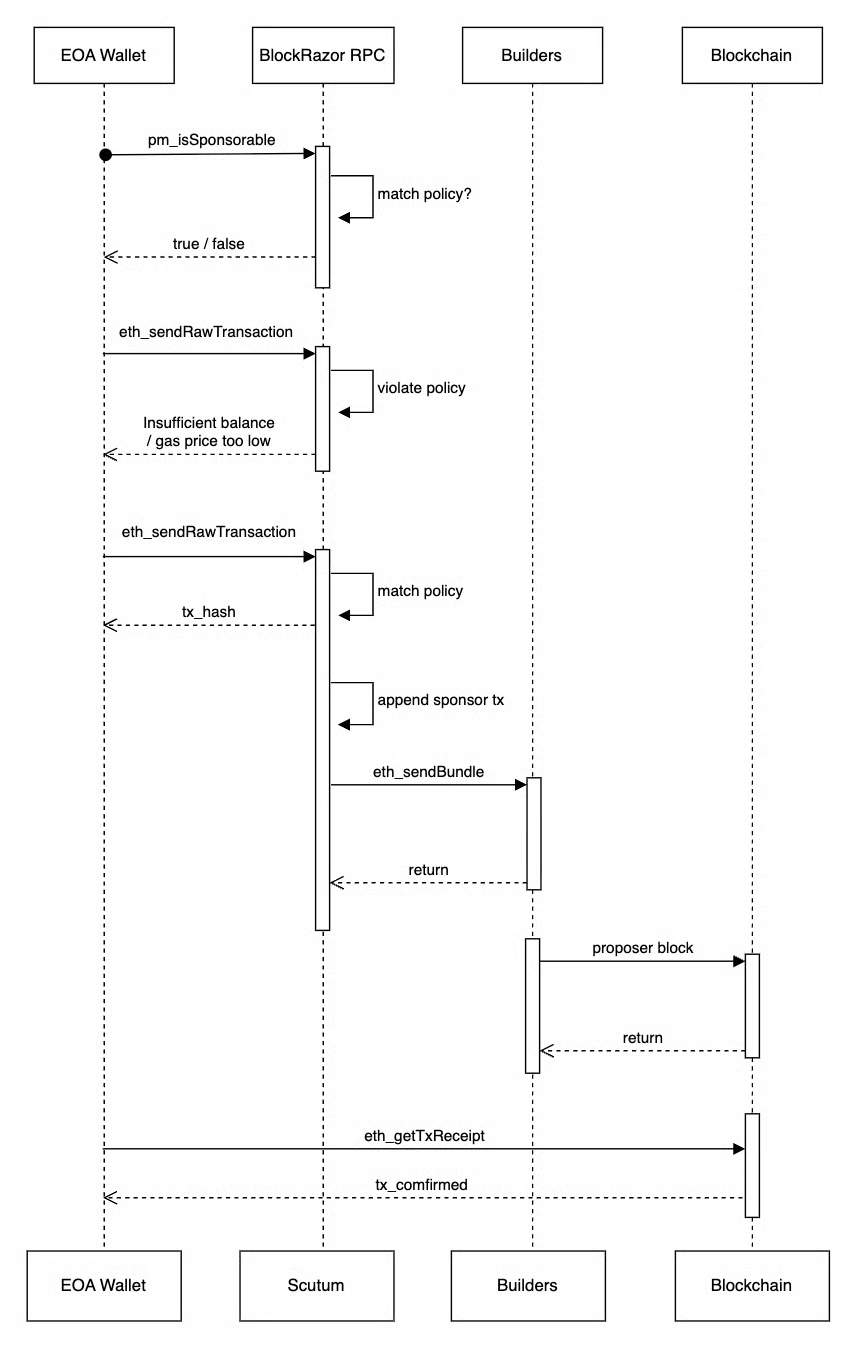
### Gas Sponso Flow(e.g. Ethereum)
#### Integration Steps
1. The user initiates a transaction from the client
2. The client calls `pm_isSponsorable` to check whether the transaction is eligible for sponsorship
3. If `pm_isSponsorable` returns true, the user signs the transaction
4. The client calls `eth_sendRawTransaction` to submit the signed raw transaction.
5. BlockRazor appends a sponsorship transaction before the user's transaction in a Bundle, then forwards the Bundle to Builders
6. The user's transaction is included on-chain as part of a sponsored bundle
---
# Agent Instructions
This documentation is published with GitBook. GitBook is the documentation platform designed so that both humans and AI agents can read, navigate, and reason over technical content effectively. Learn more at gitbook.com.
## Querying This Documentation
If you need additional information that is not directly available in this page, you can query the documentation by asking a question.
Perform an HTTP GET request on the following URL with the `ask` and `goal` query parameters:
```
GET https://docs.blockrazor.io/transaction-submission/gas-sponsor.md?ask=&goal=
```
`ask` is the immediate question: it should be specific, self-contained, and written in natural language.
`goal` is what the user is ultimately trying to achieve, the reason they need the answer. Sharing it helps GitBook give you a better, more relevant answer. A goal is most helpful when it describes the outcome the user wants rather than restating the question. For example, with `ask=how do I create an API token`, a goal like `automate deployments from our CI pipeline` lets GitBook tailor the answer to that use case.
The response will contain a direct answer to the question and relevant excerpts and sources from the documentation.
Use this mechanism when the answer is not explicitly present in the current page, you need clarification or additional context, or you want to retrieve related documentation sections.